_/\~~~
Route the work. Keep the receipts.
A haybox is an old kitchen trick from the fuel-rationing years: bring the pot to a boil once — the only expensive minute — then seal it in an insulated box, where retained heat finishes the cooking for free.
Haybox runs your AI coding the same way. A short burst of frontier compute for the plan and the hard reasoning. Hours of execution on the GPU you already own, at $0 marginal cost. And a receipt for every task, so you can see exactly what the boil bought.
Boil once. Simmer free.
session — one task, start to receipt
$ haybox "add org scoping to the auth middleware"

leg            where                 time      cost
plan           local · 30B-class        18s     $0.00
implement      local · 30B-class     14m 20s   $0.00
diagnose       frontier · Claude        40s     $0.31
implement #2   local · 30B-class      7m 40s   $0.00

verify         pytest 23 passed · tsc clean · ruff clean
waybill #4127  frontier $0.31 · local $0.00 · accepted
(illustrative)
Windows, macOS, Linux. Bring your own keys.
waybill — receipt
This task boiled on Claude for 40 seconds ($0.31)
and simmered on your 4090 for 22 minutes ($0.00).
Here's the diff and the 23 tests it passed.
(illustrative)
A Haybox receipt. Illustrative until launch week. Then it’s yours.
Keep the tools you have. Haybox works underneath:
Claude Code · Cline · Continue · aider · Ollama · LM Studio
Your editor stays. Your keys stay yours. Your code stays home.
The bill and the mystery
Frontier models are good, and the invoice shows it. What the invoice doesn’t show: which tasks needed a frontier model at all. Most agentic coding work is repository search, summarization, boilerplate, test generation, and first-pass edits — work a well-chosen local model completes on hardware you already own. The expensive minutes are real but rare. Today you pay frontier prices for all of it, and nothing on the bill can tell you which dollars mattered.
What Haybox does
Haybox is a local daemon that sits between your coding tools and every model you can reach. It reads the task, picks the route, verifies the result, and writes the receipt. Today it reads and it writes the receipt; the two in the middle are marked below.
Route.
Each task will run on the cheapest resource that holds quality: your GPU for the routine work, frontier APIs (your own keys) when they earn their price. Escalation happens on evidence — a failed check, low confidence — never on vibes.
Planned — not in the Stage A build.
Verify.
A diff will count as done when your project’s own checks pass: tests, build, types, lint, detected from your configuration. “Success” has a definition here, and it’s published.
Planned — not in the Stage A build.
Account.
Every task gets a Waybill: the route it took, what each leg cost, what verified. Daily and monthly rollups show spend, the estimated frontier-only baseline, and the difference.
Two ways in. Neither asks you to switch.
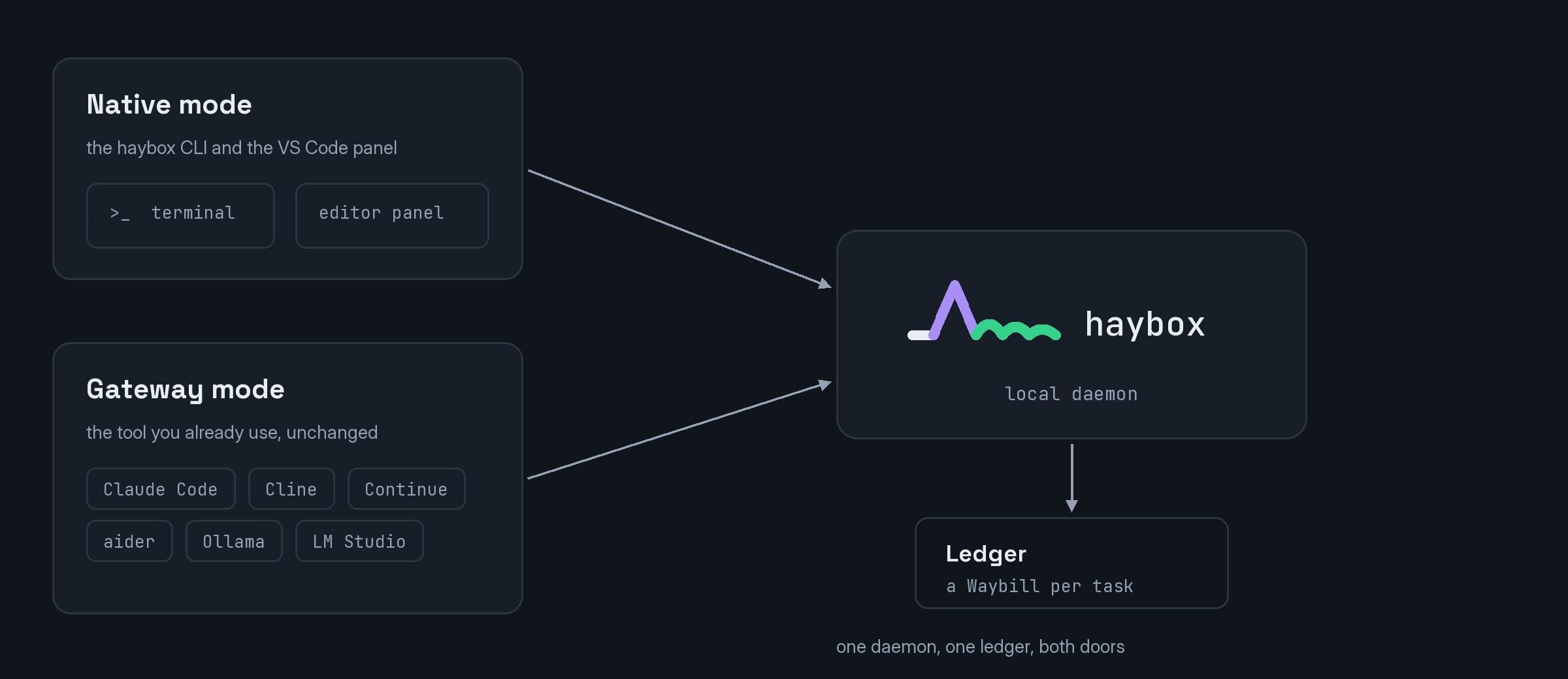
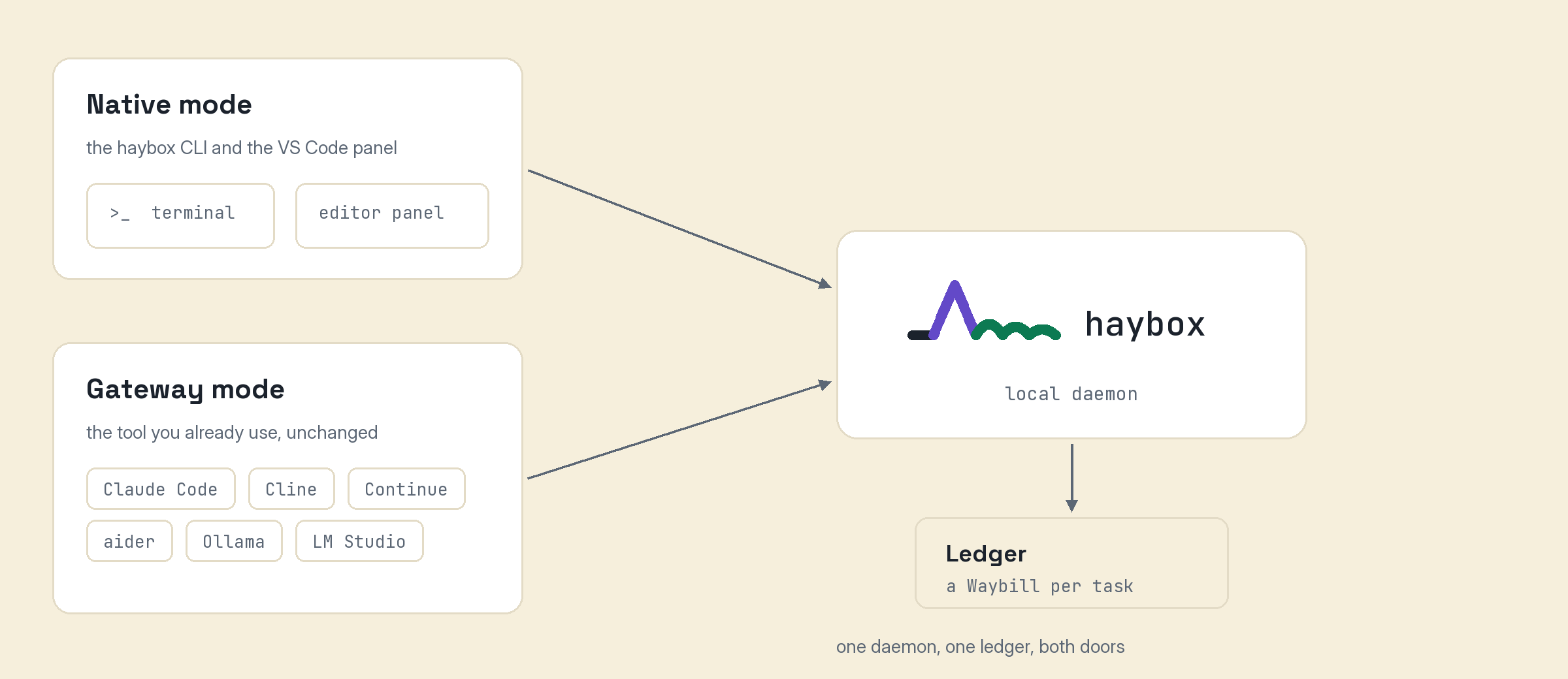
Two ways in. Illustrative.
Native mode.
The haybox CLI agent and a VS Code panel. Describe the task, review the plan preview (the files and symbols it believes are affected, with a confidence figure), watch routed execution, accept or reject a verified diff. Edits run in an isolated workspace with a checkpoint at every step and one-click revert.
Planned — not in the Stage A build.
Gateway mode.
Haybox exposes standard local endpoints. Point Claude Code, Cline, Continue, or aider at it — one configuration line; the docs show it for your tool — and keep working exactly as before while the routing and the ledger run underneath.
Start in Shadow Mode. Change nothing.
Skeptical is the correct default, so the first month asks nothing of you. In Shadow Mode, Haybox passes every request through untouched while it classifies your tasks and simulates what routing would have done. Thirty days later you get a report built from your own traffic, not our marketing.
shadow-report
LAST 30 DAYS — SHADOW MODE                (illustrative)
                                          SIMULATED

Frontier spend:                  $118.40
Simulated with routing:           $31.20
Estimated avoidable:              $87.20   (74%)

Tasks the router would keep local:    61%
Tasks it would escalate anyway:       39%

Method: routing replayed against recorded traffic.
Prices read as_of [date].
Estimates come labeled as estimates. When you turn routing on, sampled comparisons against the frontier baseline turn the estimate into a measurement, with a confidence interval.
Cheap only counts if it holds
The known failure of every cost optimizer is quiet decline: savings up, quality drifting down, trust gone. Haybox is built against that failure.
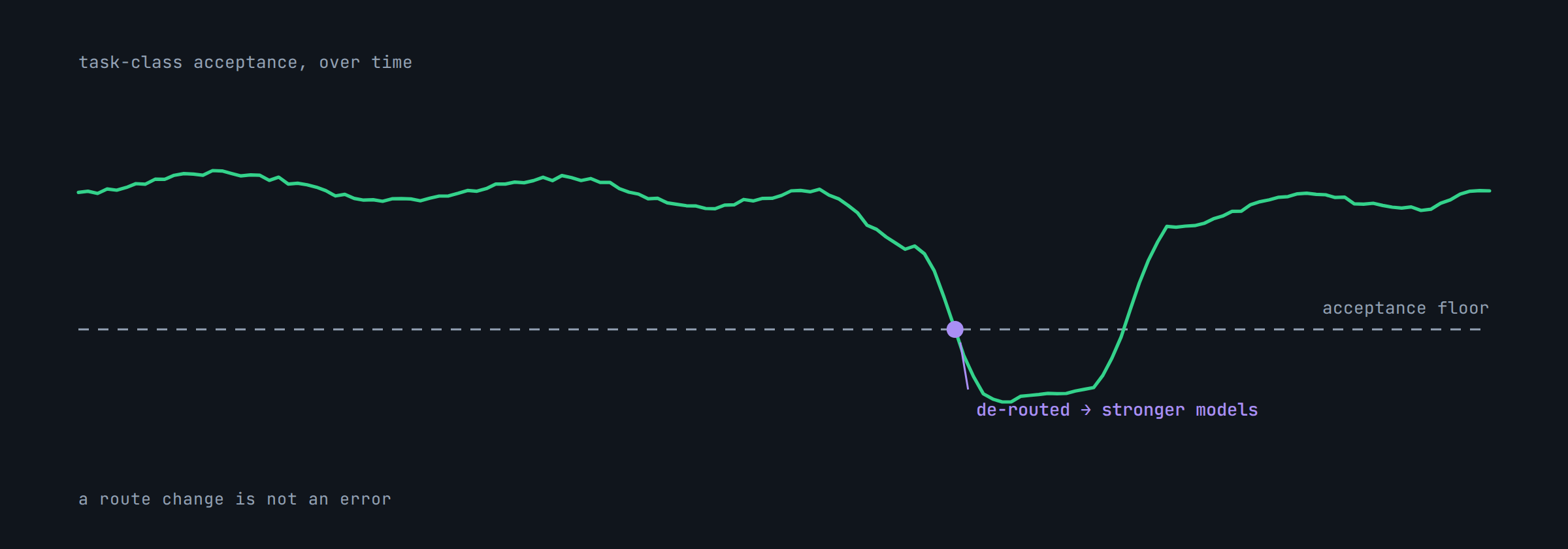
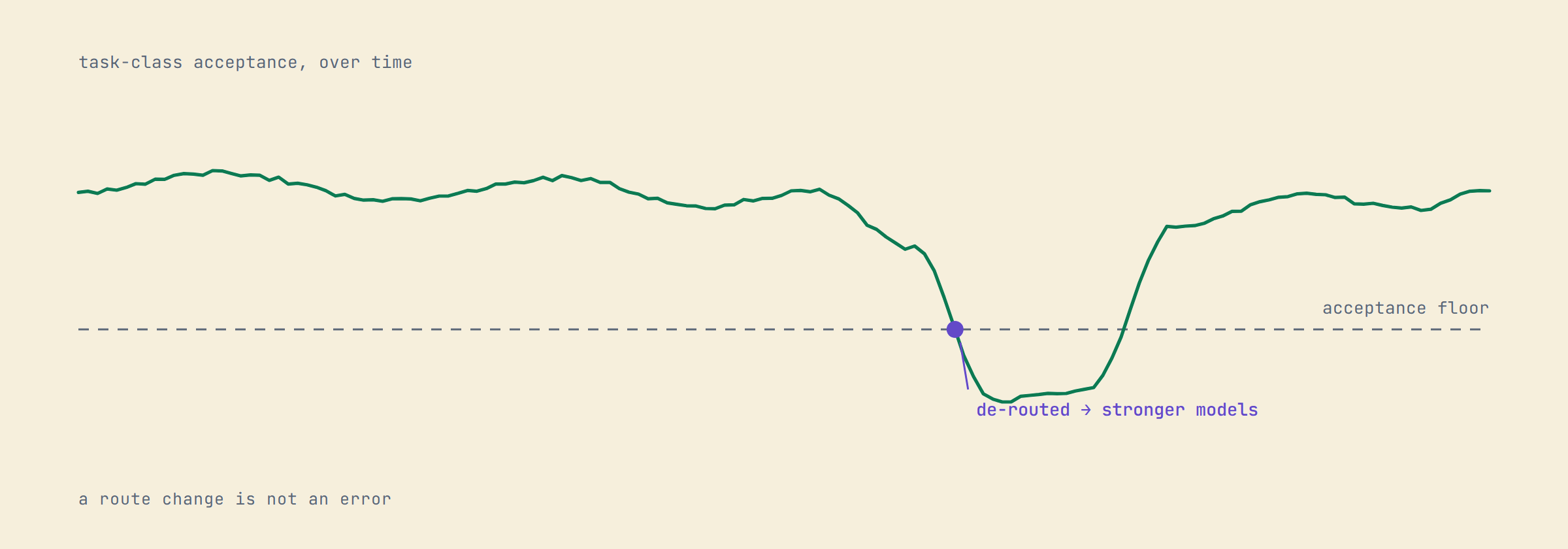
A task class dipping below its floor and de-routing. Illustrative.
- Every task class has an acceptance floor. If locally routed work on a class slips, that class de-routes to stronger models automatically, with a visible notice. No silent downgrades.
- Best Quality mode skips cost optimization entirely. The escape hatch is real, and it stays real.
- Reverts count against us. A change you accepted but reverted within a week is recorded as a failure in our own ledger. Few tools measure that; this one is built on it.
Where the work actually ran
Every leg of every task is on the ledger, coloured by where it ran. This is what a month looks like when the routine work stays home.
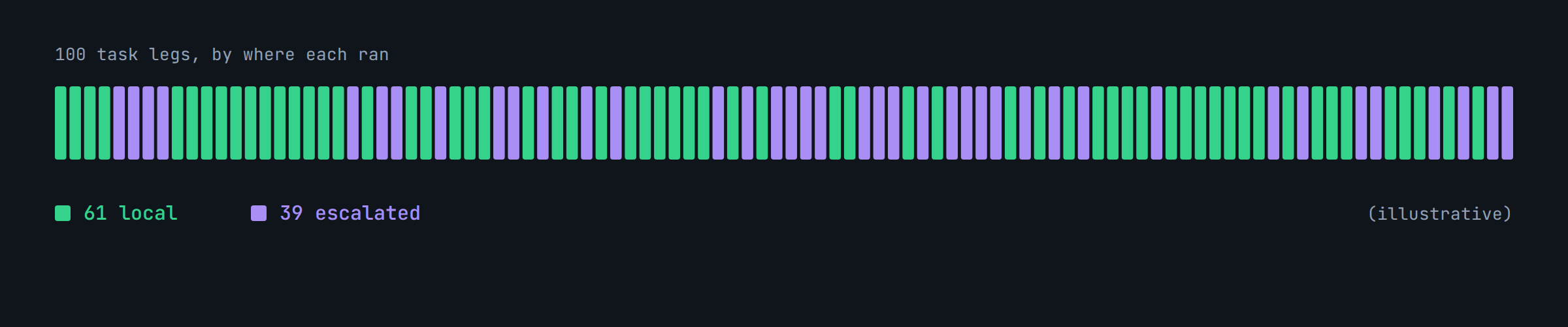
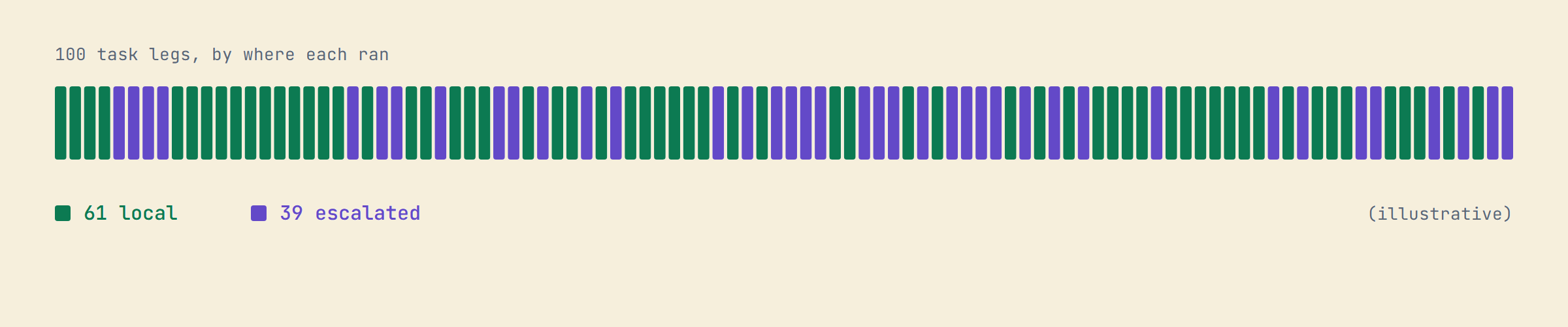
100 task legs: 61 local, 39 escalated. Illustrative.
Method: the 61/39 split is an illustrative sample, not a measurement. Measured splits publish on the Benchmarks page with their intervals.
Your rules load every time
Write standing instructions in plain markdown: one file for you, one in the repository root, reviewable in a pull request like any other change. “Prefer plain Python over another abstraction.” “Run the regression suite before proposing a diff to scanner.py.” Because Haybox assembles the model’s context itself, injection is deterministic — your rules load every time, not most of the time.
Already keeping a CLAUDE.md, AGENTS.md, or .cursorrules? Haybox reads them natively from day one. Nothing to migrate, nothing to maintain twice.
Local models without the homework
Haybox detects your GPU, VRAM, RAM, and OS, then recommends a setup for your exact machine — which model class, which size, which quantization — and installs it in one click through Ollama, LM Studio, or a llama.cpp server. No release-notes archaeology, no trial-and-error downloads. When the recommendation changes, you’ll see why, with numbers.
Local-first, open where it counts
The daemon, the Ledger, the Project Brain, and your rules all live on your machine. Nothing leaves by default; frontier calls go directly from your machine to the provider using your own keys. The adapters and ledger schema are Apache-2.0; the daemon core is source-available for anyone to read and self-host. The part you subscribe to is the routing service that keeps getting better. And a pledge in writing: the licensing never moves in a more restrictive direction.
The number we publish against
Stated before launch so you can hold us to it:
Target: cut paid frontier tokens by 70–90% on suitable workloads, with no more than a 5-point drop in task success.
Measured two ways: a public benchmark subset anyone can re-run, and design partners’ real repositories with sampled frontier comparisons, so the claim carries a confidence interval instead of an adjective.
measured-to-date
Current measured results:
[pending — first report lands launch week]
They live on the Benchmarks page and update monthly.
Pricing, briefly
Local-only and observation are free forever. The learned routing service is $29/mo. Full table on the pricing page; it fits on one screen.
Free $0 | Developer $29/mo | |
|---|---|---|
| Native agent (Local Only mode) | ✓ | ✓ |
| Gateway + Shadow Mode | ✓ | ✓ |
| Savings reports | ✓ | ✓ |
| Ledger | basic | full |
| Learned routing service (all tiers) | — | ✓ |
| Model Manager | — | ✓ |
Questions people actually ask
Does my code leave my machine?
By default, no. Local tasks run on your hardware. When the router escalates, that call goes directly from your machine to the frontier provider using your own key, never through our servers. Paths you mark protected are never sent to any cloud, and the setting lives in a file you can read.
Do I have to change editors?
No. Use the native CLI and VS Code panel, or point Claude Code, Cline, Continue, or aider at the local gateway and keep your workflow.
What hardware do I need?
The full local experience wants 16 GB+ of VRAM or Apple silicon with 32 GB+ unified memory. With less, Shadow Mode and the Ledger still earn their keep, and the router simply escalates more.
What happens when the local model isn’t good enough?
Verification catches it and the router escalates. If a whole task class slips below its acceptance floor, that class de-routes automatically, visibly.
Is it free?
The native agent in Local Only mode, the gateway, Shadow Mode, and savings reports are free forever, one machine. The $29/mo Developer plan adds the learned routing service across all tiers.
Does it run on Windows?
Yes, natively. Single binary, real GPU detection, no WSL required. Apple silicon and Linux too.
I already have a CLAUDE.md.
Keep it. Haybox reads CLAUDE.md, AGENTS.md, and .cursorrules as rules sources with configurable precedence, and tells you which file each rule came from.
Does anything I do in one repo leak into another?
No, and not as a setting: v1 has no cross-project path at all. There is nothing to switch off.
See what your own traffic says.
Shadow Mode reports on the traffic you already have. Before that exists for you, the calculator will estimate it from your GPU and your monthly spend, and show you every assumption it used to get there.